
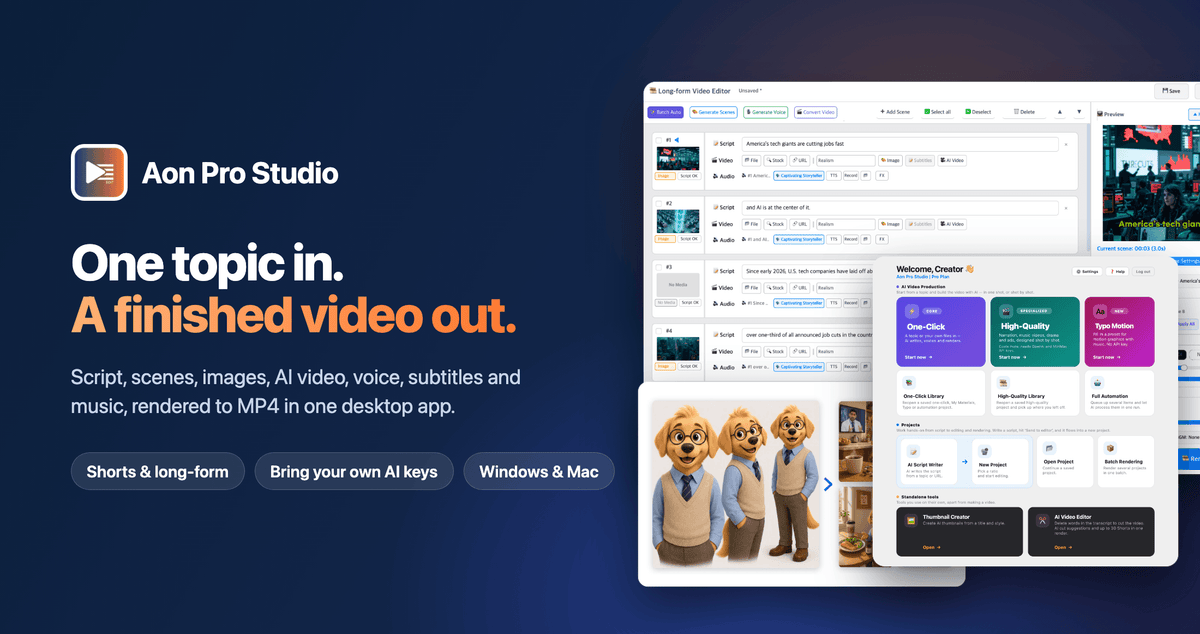
Want to turn any idea into a finished AI video without juggling multiple tools?
Aon Pro Studio transforms a single topic into a complete, ready-to-publish video. From writing the script to generating visuals, adding voiceovers and music, and rendering the final MP4, everything happens in one desktop app.
Create professional-looking videos faster, maintain consistent characters and scenes, and produce content at scale without paying for multiple software subscriptions.
-
Create videos from start to finish: Generate scripts, images, AI video clips, voiceovers, subtitles, and background music in one workflow.
-
Keep every scene consistent: Maintain the same characters, locations, outfits, and products throughout your video.
-
Produce content at scale: Automate workflows, queue multiple topics, and batch-render videos.
-
Choose your production style: Create narrated stories, music videos, serialized dramas, and advertisements.
-
Control your AI costs: Use your own API keys and pay providers directly at their rates, with no platform credits or monthly subscription fees.
Stop switching between tools and start turning your ideas into finished videos.
Get started with Aon Pro Studio and simplify your entire AI video production workflow.
Compatibility: Windows 10/11 (64-bit) and Apple Silicon Macs (M1 or later, macOS 14 or later).
Requirements: An OpenAl API key is required. A MiniMax API key is required for Al video clips and the High-Quality modes (Narrated Story, Music Video, Story Drama, Advertising). ElevenLabs and Typecast are optional.
Create complete AI videos in one app: Generate scripts, images, video clips, voiceovers, subtitles, and music, then render a finished MP4.
Maintain visual consistency: Keep characters, locations, outfits, and products consistent across scenes.
Choose from 4 production modes: Create narrated stories, music videos, serialized dramas, and advertisements.
Automate production and control costs: Batch-render videos using your own AI keys, with no platform credits or monthly subscription fees.
Why Aon Pro Studio?
Creating AI videos shouldn't mean managing a collection of disconnected tools, subscriptions, and manual editing tasks. Aon Pro Studio brings the entire production process together in one desktop application, giving you more control over your workflow, creative output, and AI spending.
-
One complete video production workflow: Go from script to finished MP4 without moving files between multiple apps.
-
Consistent characters and visuals: Use character, location, and product sheets to keep faces, outfits, environments, and products consistent across scenes.
-
No monthly platform fees: Run the app using your own AI provider keys and pay for usage directly to each provider.
-
Four dedicated production modes: Create narrated stories, AI music videos, multi-episode story dramas, and product advertisements.
-
Automation built for volume: Queue topics, news URLs, YouTube URLs, or book quotes and batch-render your videos.
-
Flexible voice generation: Work with OpenAI, MiniMax, ElevenLabs, and Typecast voice services.
-
Tools for existing footage: Extract AI highlights and edit videos using word-based editing.
-
Direct YouTube publishing: Upload finished videos to your channel from within the app.
How It Works
From a simple idea to a finished video in a few steps.
Step 1: Choose your topic and production mode
Enter a topic and select the format that suits your project: Narrated Story, Music Video, Story Drama, or Advertising.
Step 2: Generate your script and scenes
Aon Pro Studio turns your idea into a script and breaks it into scenes, preparing the content for visual production.
Step 3: Create your visuals and audio
Generate images, AI video clips, voiceovers, subtitles, and background music using your connected AI providers.
Step 4: Keep everything consistent
Use character, location, and product sheets to maintain visual continuity across scenes, helping your videos feel like cohesive productions rather than disconnected clips.
Step 5: Render and publish
Bring all your assets together, render the finished MP4, and upload it to YouTube directly from the app when you're ready.
Want to produce more? Queue multiple topics or supported URLs and let Full Automation handle batch production.
Key Features that Take Your AI Video Production Further

End-to-End Video Creation
Turn scripts, scenes, images, AI video clips, voiceovers, subtitles, and background music into a finished MP4, all within one application.
Consistent Characters, Locations, and Products
Maintain continuity across every scene with dedicated character, location, and product sheets. Keep the same faces, outfits, environments, and product details throughout your videos.
Four Creative Production Modes
Choose the workflow that fits your content:
-
Narrated Story: Create story-driven videos with narration and visuals.
-
Music Video: Produce AI-generated music video projects.
-
Story Drama: Build multi-episode series featuring speaking characters.
-
Advertising: Create product-focused video advertisements without a film crew.
Full Automation and Batch Rendering
Queue topics, news URLs, YouTube URLs, or book quotes and process multiple videos in batches. Spend less time repeating production tasks and more time developing new content.
Typo Motion
Create motion-graphics videos from ready-made presets and music. The presets need no API key.
AI Highlight Extraction and Word-Based Editing
Work with existing footage by extracting AI-generated highlights and editing content at the word level.
Flexible AI Voice Generation
Choose from OpenAI, MiniMax, ElevenLabs, and Typecast to generate voiceovers for different content styles and projects.
Direct YouTube Uploads
Publish finished videos to your YouTube channel directly from the app, making it easier to move from production to distribution.
Built-In Update Notifications
Stay informed about software updates through notices on the app's dashboard.

Who's Aon Pro Studio Best For?
-
Faceless YouTube, TikTok, and Shorts Creators: Produce narrated videos, stories, and short-form content without appearing on camera. Automate repetitive production steps and scale your publishing workflow.
-
Content Marketers and Small Agencies: Create video content for multiple campaigns, clients, or channels while reducing the time spent switching between tools.
-
Solo Creators and Small Businesses: Turn product ideas into video advertisements without hiring a film crew or coordinating a complex production process.
-
Storytellers and Series Creators: Develop AI music videos, recurring characters, and multi-episode dramas with greater visual consistency across scenes and episodes.
-
Creators Who Want More Control Over AI Costs: Use your own API keys, pay providers directly for usage, and avoid platform credit systems and monthly subscription fees.

⭐⭐⭐⭐⭐ The original reviews (Korean) can be found here https://kmong.com/gig/749339