
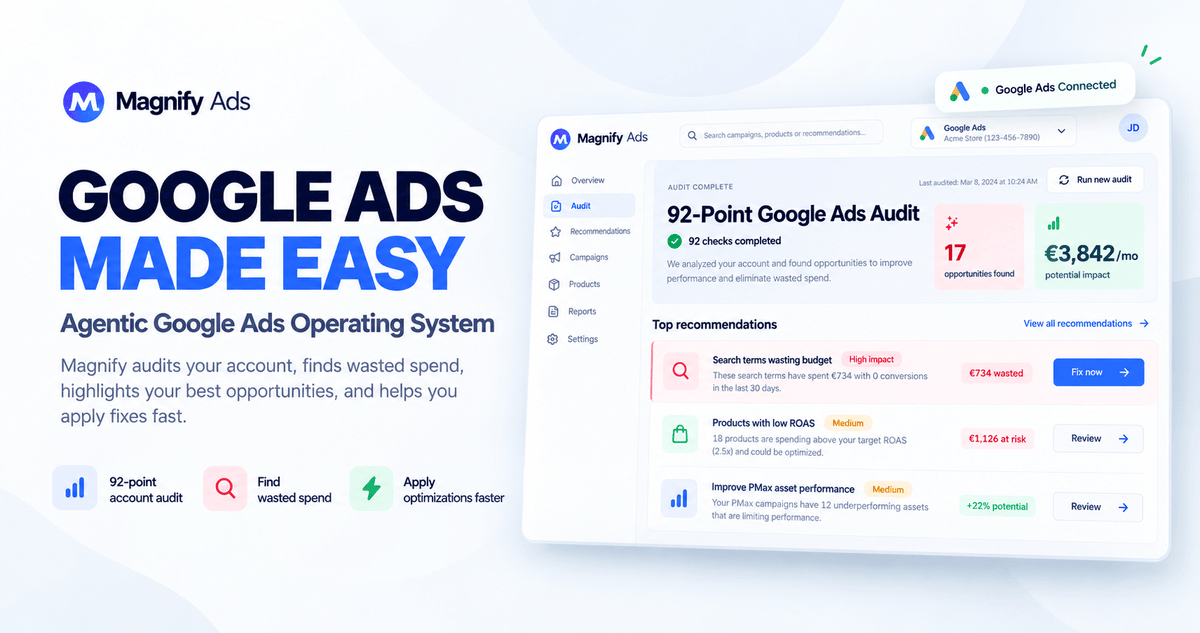
Google Ads gives you more data than ever.
The problem is knowing what to do with it. Which search terms are wasting money Which products deserve more budget? Which campaigns need attention? Which negatives are safe to add? Which product titles are holding back Shopping performance?
And, most importantly: What should you do next?
Magnify turns Google Ads, Merchant Center, product, and business data into clear decisions.
It continuously analyzes your account, identifies opportunities and risks, explains why they matter, and prepares the action for you.
Magnify recommends. You decide. Agent executes.
Instead of spending hours inside reports, spreadsheets, and campaign settings, you get a prioritized view of where money is being wasted, where growth may be hiding, and which changes are worth making.
Connect your Google Ads account and let Magnify start doing the PPC work.
It is built for e-commerce owners, agencies and marketing teams that want to improve Google Shopping performance and make more of their existing ad spend without adding unnecessary complexity.
Why Magnify?
Most Google Ads tools give you dashboards. Google gives you recommendations. Agencies give you reports. Magnify is designed to go one step further by helping you answer a more practical question: What should you do with your next advertising dollar?
Find where money is leaking
Magnify looks across your campaigns, search terms, products, conversion tracking, budgets, and feeds to identify areas that deserve attention. Instead of scrolling through thousands of rows of data, you get a clear view of the issues and opportunities that can actually affect your performance.
Turn data into better decisions
Not every bad search term is a bad keyword, and not every low-ROAS product should be paused. Likewise, a high-ROAS campaign isn't necessarily where your next dollar should go. Magnify combines multiple signals across your account to put each recommendation into context and help you understand what action makes sense.
Keep humans in control
Magnify is built to support your decisions, not take them away. For every recommendation, you can see what happened, why it matters, what Magnify recommends, and what action it would take. You stay in control and can approve, edit, or ignore any recommendation.
Automate the repetitive PPC work
Once you've identified the areas that need attention, AI Loops and Business Rules can keep monitoring them for you. Set them up to regularly check search-term waste, budget pacing, product performance, account health, and other important areas, so you don't have to remember to run the same audits every week.
Optimize Shopping at the product level
Magnify also includes the Google Shopping optimization system that started the product. Improve product titles, test variations, identify underperforming products, and publish optimized changes through supplemental feeds without overwriting your original product catalog.
How It Works
-
Connect Google Ads
Connect your Google Ads account through Google's official OAuth flow. Where relevant, you can also connect Merchant Center and your ecommerce data to give Magnify a more complete view of your business.
-
Magnify audits your account
Once connected, Magnify runs its 92-point Account Health audit across key areas including measurement, campaigns, budgets, search terms, products, feeds, and account structure. This creates a clear picture of what is working and where attention may be needed.
-
Magnify finds the opportunities
The Decision Stack brings together multiple specialist systems to analyze your account and identify issues and opportunities such as wasted spend, search-term problems, product opportunities, budget issues, tracking problems, and campaign inefficiencies.
-
You get a clear recommendation
Magnify doesn't just tell you what to change. It explains what it found, why it matters, and what action it recommends.
Instead of simply saying, "Add this negative keyword," Magnify can show you that a search theme has spent $892 without converting, that 287 search terms share the same intent, and which queries could be affected by the proposed negative.
-
You stay in control
Once you understand the recommendation, you decide what happens next. Approve it, edit it, ignore it, or turn the workflow into an automated rule when you're comfortable letting Magnify handle it automatically.
-
Magnify executes
For approved actions, Magnify moves them through its controlled execution workflow, helping turn your decisions into changes inside Google Ads.
Key Features that turn product data into better Shopping performance

Search Term Intelligence
Stop reviewing search terms one by one. Magnify organizes queries into meaningful themes, identifies repeated patterns of wasted spend, and helps you evaluate which negative keywords could improve performance without cutting off valuable traffic.
Negative Keyword Impact Preview
Before applying a negative keyword, see which search terms it could affect. This gives you more context to reduce wasted spend without blindly blocking potentially valuable traffic.
92-Point Google Ads Audit
Magnify continuously checks the key areas of your account, including conversion tracking, campaign structure, search traffic, product performance, Merchant Center, feeds, budgets, and bidding. This helps you spot issues before they turn into bigger problems.
Magnify Decision Stack
Multiple specialist systems analyze your account data before recommendations move toward execution. Instead of generating more alerts, Magnify focuses on identifying the decisions that actually matter.
Margin Max
Bring real product economics into your advertising decisions. Margins, AOV, LTV, and product performance can help you understand where your budget may create more value instead of relying on headline ROAS alone.
Campaign Creation
Create Google Ads campaigns through a guided workflow that brings strategy, structure, and setup together, helping you move from an idea to a ready-to-run campaign.
AI Opportunities
Magnify continuously analyzes your account to surface potential opportunities and provides the evidence behind each one, so you can understand what makes an opportunity worth considering.
Business Rules
Create custom account rules based on the conditions that matter to your business, giving you a repeatable way to monitor and manage your advertising.
AI Loops
Automate recurring PPC checks and analyses so Magnify can keep monitoring important areas without requiring you to perform the same work every week.
Product Title Optimization
Rewrite Google Shopping product titles at scale using AI and your existing product information to create titles designed to improve relevance and performance.
Product Title Experiments
Create multiple product-title variations and evaluate their performance using real Shopping data, giving you a structured way to test and refine your titles.
Supplemental Feeds
Publish optimized product attributes through supplemental feeds while keeping your original ecommerce catalog intact.
Product Intelligence
Identify products that are underperforming, wasting budget, receiving too little exposure, or showing potential for additional investment. Magnify brings these signals together so you can see which products deserve a closer look.
Reporting & History
Keep a record of account findings, recommendations, and actions over time, making it easier to understand what changed, what was recommended, and how your account has evolved.
Who's Magnify Best For?
- Ecommerce owners who invest in Google Ads but don't want to spend their time becoming full-time PPC specialists. Magnify gives you the analysis and insights you need without adding another layer of manual account work.
- Lean marketing teams that need deeper Google Ads analysis without expanding their team or spending hours digging through account data.
- Freelancers and PPC consultants who want to analyze accounts faster, uncover opportunities more efficiently, and spend more time making strategic decisions.
- Agencies managing multiple clients that need repeatable Google Ads workflows to streamline analysis, recommendations, and ongoing account management.
- Shopping and Performance Max advertisers who want product, search-term, feed, and campaign intelligence brought together in one place.