
CopyMail Studio


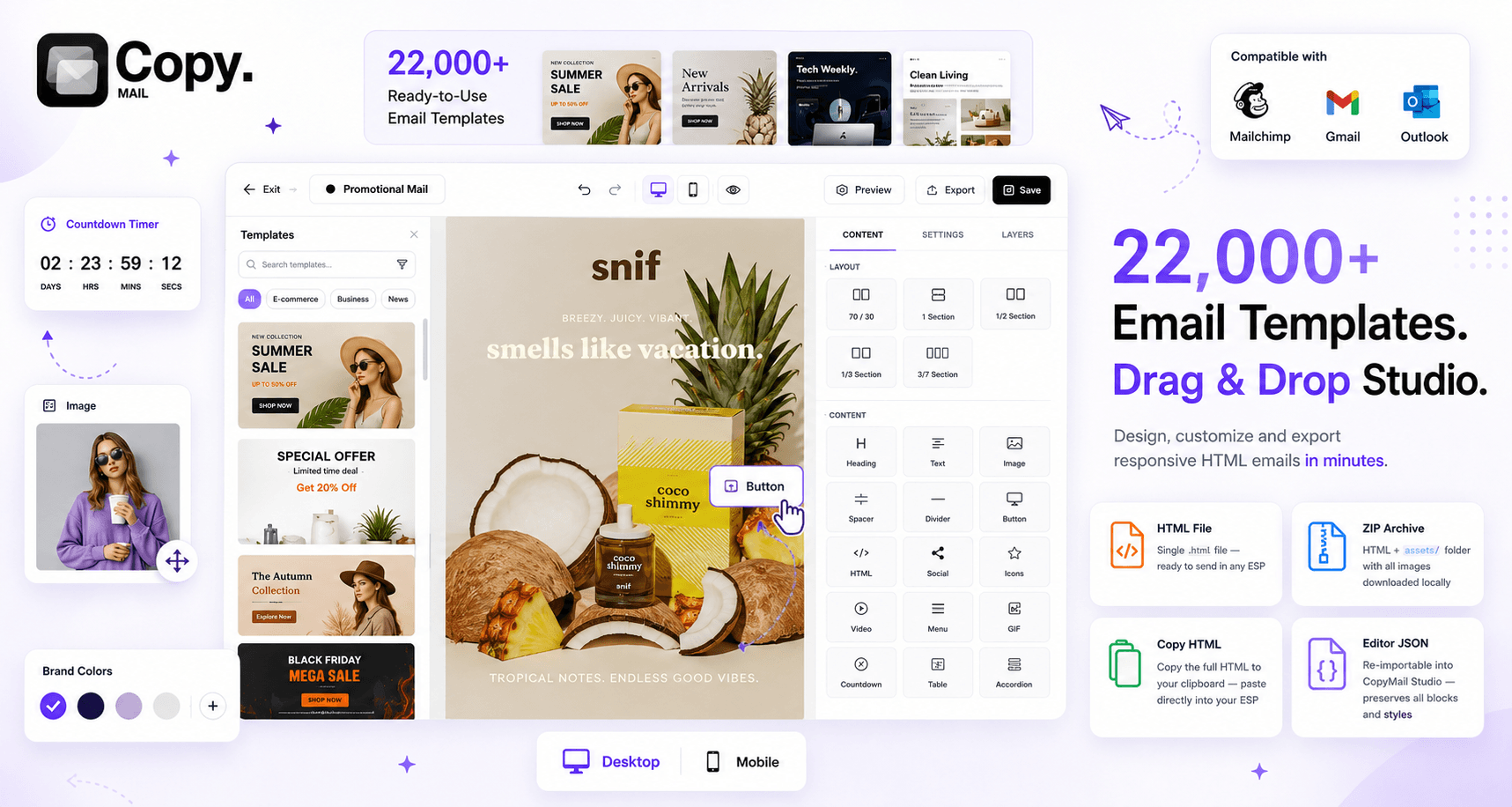
22,000+ Email Templates. One Drag-and-Drop Editor. Zero Code. The world's largest library of professional HTML email templates — browse, customize visually, and export inbox-ready code to any ESP in seconds.

Sale price$79 Regular price$790 -90% off
Select a Plan View All Plans

✅ 30 day money back guarantee

Building email templates from scratch is painful. You spend hours coding, debugging Outlook rendering bugs, testing across 50+ email clients, and still end up with broken layouts on mobile.

The alternatives are worse: free template sites give you outdated, ugly designs. Hiring a developer for every campaign is expensive and slow. DIY builders limit your creativity with rigid block systems.

CopyMail Studio fixes this:

  • No more starting from scratch — pick from 22,000+ ready-made templates
  • No more Outlook bugs — every template is pre-tested across all major clients
  • No more developer bottlenecks — anyone on your team can customize visually
  • No more vendor lock-in — export clean code and use it anywhere

Works with Any Email Platform – Export standard HTML or ZIP files that can be imported into virtually any email service provider, including Mailchimp, Klaviyo, HubSpot, Resend, ActiveCampaign, Salesforce Marketing Cloud, ConvertKit, Campaign Monitor, SendGrid, Brevo, AWeber, Postmark, Mailjet, Omnisend, Drip, GetResponse, and more.

Start creating better emails in minutes with CopyMail Studio!


22,000+ professional HTML email templates across 150+ categories


Drag-and-drop visual editor — customize any template without writing code


Export clean HTML, JSON, or ZIP directly to Mailchimp, Klaviyo, HubSpot, or any ESP


Mobile-responsive, Outlook-compatible, inbox-tested output every time


How it Works

Step 1: Start from scratch or Browse the Library Search 22,000+ templates across 150+ categories — newsletters, promotions, onboarding, transactional, and more.

Step 2: Pick Your Template Found one you like? Open it in the Studio editor with one click

Step 3: Customize Visually Drag and drop elements, swap images, edit text, change colors — all visually. No code needed.

Step 4: Export & Send Download clean HTML, JSON, or ZIP. Drop it into your ESP and hit send. Done.

Key Features That Help You Build Better Emails Faster

  • 22,000+ Email Templates – Access the world's largest email template library, with new designs added every week.
  • Drag-and-Drop Editor – Visually build emails by rearranging blocks, editing content, and customizing styles.
  • 150+ Template Categories – Find designs for eCommerce, SaaS, agencies, restaurants, fitness, finance, real estate, and more.
  • One-Click Export – Download templates as HTML, JSON, or ZIP files for use with any platform.
  • Mobile-Responsive Designs – Every template is optimized for desktop, tablet, and mobile devices.
  • Inbox-Tested Templates – Pre-verified to render correctly in Gmail, Outlook, Apple Mail, Yahoo, and other major email clients.
  • Team Workspaces – Collaborate with teammates, assign roles, and organize templates by client or brand.
  • White-Label Branding – Add your own logo, colors, and custom domain on Pro and Business plans.
  • Shareable Preview Links – Generate live preview URLs to collect client feedback before sending.
  • AI Designer (Coming Soon) – Create email templates from simple text prompts with AI-powered generation.
  • No Vendor Lock-In – Export standard HTML that works with any email service provider, with no platform dependency.

Use Cases

  • Weekly Newsletters — Pick a newsletter layout, drop in your content, send to subscribers
  • Product Launch Emails — Announce new features with polished, on-brand templates
  • E-commerce Promotions — Sale announcements, abandoned cart reminders, order confirmations
  • Onboarding Sequences — Welcome emails, feature tours, activation nudges
  • Transactional Emails — Password resets, invoices, shipping notifications
  • Agency Client Work — Manage multiple brands in separate workspaces with white-label option
  • Event Invitations — Webinar registrations, conference announcements, RSVP flows
  • Seasonal Campaigns — Holiday sales, Black Friday, end-of-year roundups

Who’s CopyMail Best For?

  • Marketing & growth teams
    Perfect for newsletters, promotions, lifecycle campaigns, product updates, and drip sequences.
  • SaaS founders & startups
    Great for onboarding emails, transactional emails, feature announcements, and activation campaigns.
  • Freelancers & agencies
    Quickly deliver polished email campaigns for multiple clients without designing every email from scratch.
  • E-commerce brands
    Use ready-made templates for abandoned carts, seasonal sales, product launches, discount campaigns, and customer updates.
  • Small business owners
    Create professional email campaigns without needing a designer, developer, or expensive custom build.
  • Non-profits & educators
    Send clean, branded newsletters, updates, announcements, and donor or student communications.

CopyMail is ideal for anyone who wants beautiful, reliable, conversion-ready emails without wasting hours inside clunky email builders.

Testimonials

Pricing - Lifetime Deal - Pay Only Once

CopyMail Studio Pro – Lifetime Subscription

  • Drag-and-drop visual editor
  • Access to 22,000+ HTML email templates
  • Unlimited projects & templates
  • 2 GB asset storage
  • 10 MB max file upload
  • All image formats (PNG, JPEG, GIF, WebP, SVG)
  • HTML, JSON & ZIP export
  • White-label dashboard (logo, colors, favicon)
  • Remove "Built with CopyMail" badge
  • Import raw HTML into editor
  • Shareable preview URLs
  • Up to 5 team members per project (15 total)
  • Priority email support
  • 30-day Money Back Guarantee
  • You must redeem your code(s) within 60 days of purchase
$79 $790

CopyMail Studio Business – Lifetime Subscription

  • Drag-and-drop visual editor
  • Access to 22,000+ HTML email templates
  • Unlimited projects & templates
  • 10 GB asset storage
  • 25 MB max file upload
  • All image formats (PNG, JPEG, GIF, WebP, SVG)
  • HTML, JSON & ZIP export
  • White-label dashboard (logo, colors, favicon)
  • Remove "Built with CopyMail" badge
  • Import raw HTML into editor
  • Shareable preview URLs
  • Up to 20 team members per project (total 50)
  • Custom workspace domain (e.g. studio.yourcompany.com)
  • AI content assist (coming soon)
  • Priority live chat support
  • Early access to new features
  • 30-day Money Back Guarantee
  • You must redeem your code(s) within 60 days of purchase
$119 $1,190

How can I activate the deal?

After purchasing you will get a unique activation code in your mailbox. Simply follow the instructions on your email and your deal is activated!

What if I’m not 100% satisfied?

We offer a hassle-free 30-day Money Back Guarantee, just drop us a message and we will make sure to process the refund as soon as possible.

How many templates does CopyMail have?

22,000+ professional HTML email templates across 150+ categories, with new ones added weekly.

Do I need to know how to code? 

No. The drag-and-drop editor lets you customize everything visually. Zero coding required.

Will templates work in Outlook?

Yes. Every template is pre-tested for Outlook, Gmail, Apple Mail, Yahoo, and all major email clients.

Can I use templates for client work? 

Absolutely. You can use any template in personal and commercial projects for yourself or clients.

Which ESPs are supported? 

All of them. CopyMail exports standard HTML that imports into Mailchimp, Klaviyo, HubSpot, Resend, and any platform that accepts HTML

Can I import my own HTML?

Yes, on Pro and Business plans. Import raw HTML and continue editing visually in the Studio editor.

Can my team collaborate? 

Yes. Invite team members, assign editor or viewer roles, and organize templates by project.

 Are templates mobile-responsive? 

Every single template is designed to render perfectly on mobile, tablet, and desktop.

Founder’s Note

Hi, I'm Saurabh Kumar — the founder of CopyMail.

I built CopyMail because I was tired of the same frustrating cycle every marketer faces: spend hours hunting for a good email template, find something mediocre, try to customize it, fight with Outlook rendering, and eventually ship something you're not proud of.

That problem felt ridiculous in 2025. We have AI writing essays and cars driving themselves — but sending a good-looking email still requires a developer? That didn't make sense.

So I built the largest email template library in the world, paired it with a visual editor that anyone can use, and made sure every single export works perfectly in every inbox. No code. No bugs. No excuses.

CopyMail Studio is the tool I wish existed when I was shipping my first product emails. I hope it saves you as much time and frustration as it would have saved me.

Saurabh Kumar, Founder

Updates & Roadmap:

Current:

  • 22,000+ templates and growing (50+ new templates added weekly)
  • Drag-and-drop visual editor with full customization
  • White-label workspaces and custom domains
  • Team collaboration with role-based access

Coming Soon:

  • AI Email Template Designer (generate from prompts)
  • Advanced email analytics and open-rate tracking
  • Zapier / Make integration for automated workflows
  • Template marketplace for community contributors
  • AI-powered subject line optimizer
  • Dynamic content blocks (personalization tokens)
  • Figma-to-email import plugin

Recently viewed

You may also like

CopyMail Studio
Starting at $79.00