
ChasePad


Client approval & asset collection. Collect files, feedback, copy, links and approvals in one streamlined workflow — with optional Notion sync.

İndirimli fiyat$129 Normal fiyat$990 -87% off
Select a Plan View All Plans

✅ 30 day money back guarantee

Still waiting on the files, copy, links, or approval you need to move a project forward?

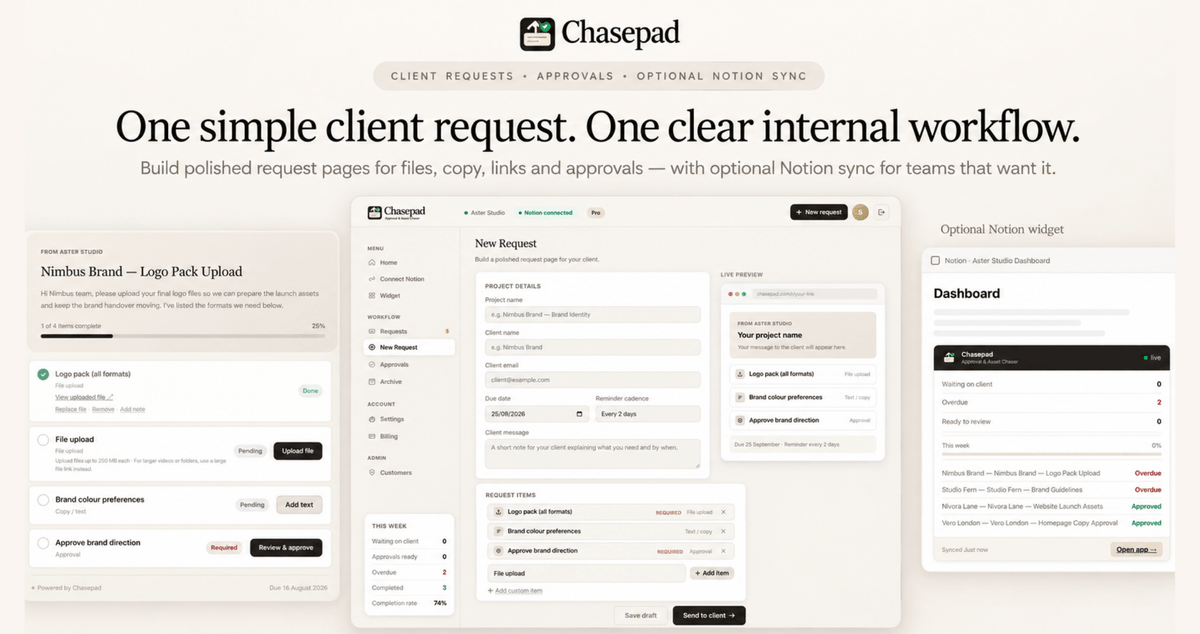
ChasePad gives agencies, studios, consultants, and client-facing teams one polished workflow for collecting everything they need from clients, without endless emails, scattered folders, or manual follow-ups.

  • Collect files, copy, links, feedback, and approvals in one request
  • Give clients one clear page to complete, with no login required
  • See exactly what is missing, waiting, overdue, or ready for approval
  • Send reminders directly from the workflow
  • Keep request statuses synced with Notion
  • Use ChasePad standalone or connect it to your Notion workspace

Bring client requests, asset collection, and sign-off into one clear workflow. Get started with ChasePad today.


Client approval & asset collection: Collect files, copy, links, feedback, and approvals through one streamlined client workflow.


Less chasing: See what is missing or overdue and send follow-ups directly from ChasePad.


Simple for clients: Give clients one focused request page without requiring them to adopt your internal tools.


Notion or standalone: Connect ChasePad to Notion for synced visibility, or use it independently for a complete client request workflow.


Why ChasePad?

ChasePad turns one of the most frustrating parts of client work into a clear, trackable process that keeps your team moving and gives clients a simple way to provide exactly what you need.

  • One place for every request: Collect files, copy, URLs, feedback, and approvals together instead of across multiple channels.
  • Less client chasing: Quickly identify missing or overdue items and send follow-ups directly from ChasePad.
  • Simple for clients: Clients get a focused request page without needing to learn or adopt your internal project-management tools.
  • Clear project visibility: Instantly see what is waiting, overdue, ready for review, or complete.
  • Notion integration: Keep request statuses and project visibility connected to your existing Notion workspace.
  • Works standalone: You do not need Notion to use ChasePad.
  • Built for client-facing teams: Designed around the specific bottleneck of collecting everything needed before work can move forward.

How It Works

  1. Create your client request

Start by creating a clear request that brings together everything you need from your client, including files, links, copy, feedback, approvals, and other project requirements.

  1. Send one polished request page

Share a single, professional request page where clients can provide everything in one place. They don't need to create an account, log in, or learn another internal tool.

  1. Track what's still missing

See the status of every request at a glance and quickly identify what's waiting, overdue, approved, or complete. When something is still outstanding, you can send reminders directly from ChasePad.

  1. Connect Notion if you want to

Keep the standalone ChasePad workflow as your main workspace, or optionally connect Notion when you want to sync request statuses and add a live ChasePad widget to your Notion workspace.


 Key Features that keep client projects moving

  • Client asset collection: Request logos, images, documents, ZIP files, and other project assets in one place.
  • Approval checkpoints: Get clear sign-off on directions, assets, deliverables, and other project milestones.
  • Copy and link requests: Collect written content, URLs, notes, and other information alongside file requests.
  • Request tracking: See exactly which items are waiting, overdue, ready for approval, or complete.
  • Client follow-ups: Send reminders for outstanding items directly from the workflow.
  • Request history: Keep internal notes and request context together for better project visibility.
  • Central Requests and Approvals: Manage outstanding client requests and approvals from dedicated views.
  • Dashboard visibility: Quickly see what needs attention across your active requests.
  • Notion integration: Sync request statuses directly with your Notion workspace.
  • Live Notion widget: Add ChasePad to your Notion dashboard to monitor requests without leaving your workspace.
  • Standalone workflow: Use ChasePad independently if Notion is not part of your current setup.

Who's ChasePad Best For?

    ChasePad is designed for teams that regularly need client input before they can complete or move forward with a project.

    • Creative, marketing, web, and digital agencies
    • Design and branding studios
    • Consultants
    • Freelancers managing multiple client projects
    • Small B2B and service-based teams
    • Client-facing businesses collecting assets, information, feedback, or approvals

    It is particularly useful when your team regularly sends messages like "just following up on the files", "still waiting for approval", or "could you resend the final copy?"

    Instead of managing those requests across email, shared folders, messages, and project-management tools, ChasePad gives both your team and your clients one clear place to handle them.

    Pricing - Lifetime Deal - Pay Only Once

    ChasePad – Lifetime Subscription Plan A

    • 1 workspace
    • 3 internal team seats
    • 25 new client request workflows per month*
    • Unlimited clients and external reviewers
    • 5 GB total file storage
    • 250 MB maximum individual file upload
    • Client-facing request pages
    • Request files and file replacements
    • Request written copy and information
    • Request links and URLs
    • Large-file links via services such as Google Drive, Dropbox, WeTransfer, Frame.io and similar platforms
    • Approval checkpoints and sign-off tracking
    • Request changes and resubmissions
    • Notes on submissions
    • Reminders and follow-ups
    • Request progress and status tracking
    • Dashboard showing waiting, overdue, ready-to-approve and completed work
    • Needs Attention view
    • Requests and Approvals views
    • Archive and request history
    • Optional Notion integration
    • Notion status sync
    • Live ChasePad Notion widget
    • 30-day Money Back Guarantee
    • You must redeem your code(s) within 60 days of purchase

    *One workflow credit is used each time you send a new client request. Everything that happens afterward, including client responses, file uploads, approvals, change requests, reminders, edits, and resubmissions, is included without using additional credits. Your monthly workflow allowance resets each month, and unused credits do not roll over.

    $129 $990

    ChasePad – Lifetime Subscription Plan B

    • 3 workspaces
    • 10 internal team seats
    • 75 new client request workflows per month*
    • Unlimited clients and external reviewers
    • 15 GB total file storage
    • 500 MB maximum individual file upload
    • Client-facing request pages
    • Request files and file replacements
    • Request written copy and information
    • Request links and URLs
    • Large-file links via services such as Google Drive, Dropbox, WeTransfer, Frame.io and similar platforms
    • Approval checkpoints and sign-off tracking
    • Request changes and resubmissions
    • Notes on submissions
    • Reminders and follow-ups
    • Request progress and status tracking
    • Dashboard showing waiting, overdue, ready-to-approve and completed work
    • Needs Attention view
    • Requests and Approvals views
    • Archive and request history
    • Optional Notion integration
    • Notion status sync
    • Live ChasePad Notion widget
    • Priority support
    • 30-day Money Back Guarantee
    • You must redeem your code(s) within 60 days of purchase

    *One workflow credit is used each time you send a new client request. Everything that happens afterward, including client responses, file uploads, approvals, change requests, reminders, edits, and resubmissions, is included without using additional credits. Your monthly workflow allowance resets each month, and unused credits do not roll over.

    $249 $1,990

    How can I activate the deal?

    After purchasing, you'll receive a unique ChasePad activation code by email. Follow the redemption instructions to create or sign in to your ChasePad account and activate your lifetime plan. No credit card is required.

    What if I’m not 100% satisfied?

    We offer a hassle-free 30-day Money Back Guarantee, just drop us a message and we will make sure to process the refund as soon as possible.

    Do I need Notion to use ChasePad?

    No. You can use ChasePad as a standalone client request workflow. If you use Notion, you can connect it to keep request statuses synced automatically.

    How does ChasePad work with Notion?

    When connected, ChasePad syncs your request workflow back to Notion so you can see what is waiting, approved, overdue, or complete without updating things manually.

    Can I use ChasePad without connecting Notion first?

    Yes. You can start using ChasePad without Notion and connect it later if you want automatic sync.

    Can I request files, copy, links, and approvals in one place?

    Yes. A single ChasePad request page can collect uploads, written content, links, feedback, and approval checkpoints in one client-facing flow.

    Do my clients need a Notion account?

    No. Clients open one clean request page and complete what you need without needing Notion.

    What kinds of projects can I use ChasePad for?

    It works well for brand projects, websites, content production, creative reviews, strategy sign-off, and other client delivery workflows.

    Can I see what is still missing?

    Yes. ChasePad helps you track what is still waiting, approved, overdue, or complete so you always know where each request stands.

    Does ChasePad send reminders?

    Yes. You can send reminder emails directly from ChasePad when a client still has outstanding items. ChasePad keeps the request, progress and follow-up action together in one workflow, so you do not need to switch back to your inbox to chase missing items.

    What makes ChasePad different?

    ChasePad is built specifically for collecting what clients owe you - files, approvals, copy, links, and feedback — in one elegant workflow, with optional Notion sync.

    Founder’s Note

    Hi there,

    Client projects often slow down for a simple reason: the work is ready to move forward, but the team is still waiting for something from the client.

    ChasePad was built to make that part of the process clearer and easier to manage. Instead of chasing files across email threads, checking multiple tools, or manually tracking what is still outstanding, teams can send one polished request and see exactly where everything stands.

    The goal is simple: make client requests easier to complete, easier to track, and easier to move through to final approval.

    Sisiceliwe Ncube, Founder

    Recently viewed

    You may also like

    ChasePad
    Starting at $129.00