
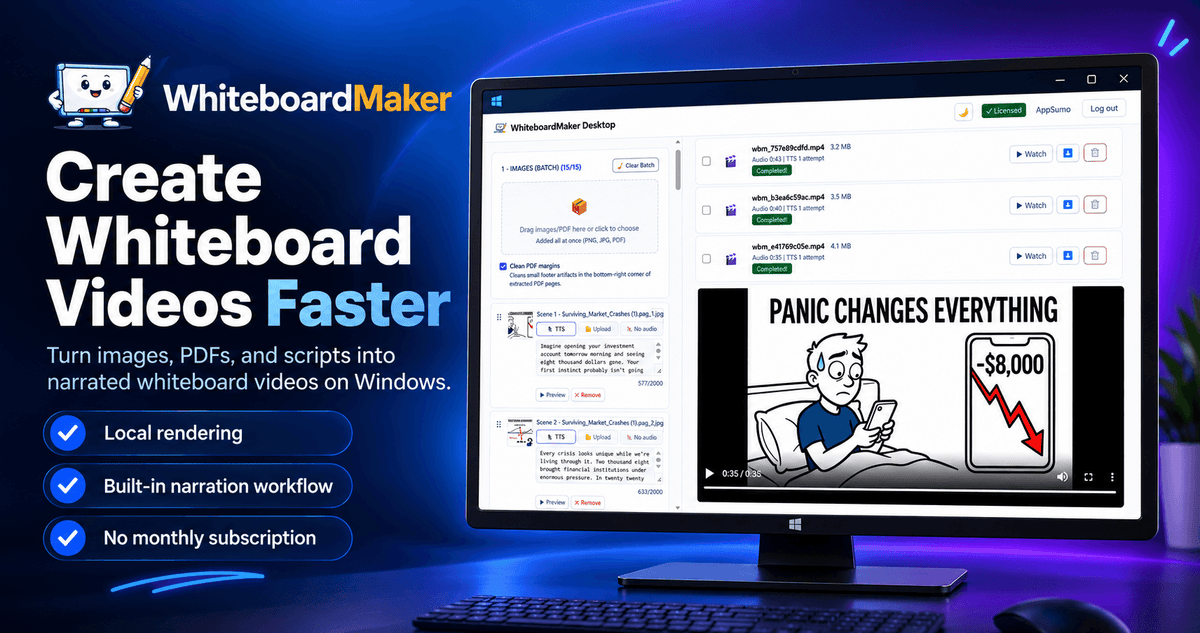
Want to create engaging videos without showing your face, juggling multiple tools, or paying monthly rendering fees?
WhiteboardMaker helps you turn images, PDF pages, and scripts into narrated whiteboard videos for YouTube, TikTok, Reels, and more, all from one Windows desktop app.
Create educational content, explainers, storytelling videos, and faceless channel content with a streamlined workflow that gives you more control over production.
-
Turn content into videos: Transform images, PDF pages, and scripts into animated whiteboard videos.
-
Add AI narration: Generate narrated videos in multiple languages or upload your own audio.
-
Produce more in less time: Create individual scenes or process multiple scenes in batches, then merge them into a single MP4.
-
Keep production costs predictable: Render videos locally on your Windows computer with unlimited local video generation and no per-video rendering credits.
-
Pay once, create for life: Get lifetime access without a recurring WhiteboardMaker subscription.
Whether you're building a faceless YouTube channel or producing educational content for clients, WhiteboardMaker helps you simplify production and publish more consistently.
Turn your ideas into whiteboard videos and take control of your content production with WhiteboardMaker.
Turn images, PDFs, and scripts into narrated whiteboard videos for YouTube, TikTok, Reels, and educational content.
Import content, organize scenes, generate narration, customize animations, and export your finished MP4 in one Windows desktop app.
Render videos on your own computer with no per-video rendering credits or mandatory paid AI API subscriptions for the standard workflow.
Get lifetime access with a one-time payment, plus AI narration, multilingual content creation, batch production, and customizable whiteboard animations.
Why WhiteboardMaker?
WhiteboardMaker brings the essential steps of whiteboard video production into one desktop workflow, helping creators save time, reduce recurring software costs, and scale content creation without adding unnecessary complexity.
-
One streamlined workflow: Import images, PDF pages, and scripts, organize scenes, add narration, customize animations, and export your finished videos.
-
Unlimited local rendering: Generate videos on your own computer without paying per render or purchasing rendering credits.
-
Lifetime access: Pay once for your license instead of adding another monthly video production subscription.
-
AI narration in multiple languages: Create voiceovers for different audiences or use your own recorded audio.
-
Built for consistent publishing: Produce short-form and long-form videos, with batch processing to help you manage larger projects.
-
More creative control: Customize drawing hands, art styles, camera behavior, stroke duration, frame rate, and other rendering settings.
-
Less repetitive work: Import narration from TXT or DOCX files and automatically distribute text across slides or scenes.
-
More reliable production: Retry failed jobs without rebuilding scenes and automatically retry suspiciously truncated AI narration.
-
A practical desktop solution: Keep your main video rendering process local and maintain greater control over your production workflow.
How It Works
Create a complete whiteboard video in a few straightforward steps.
Step 1: Import Your Content
Start with images, PDF pages, or a script. Import narration from TXT or DOCX documents and let WhiteboardMaker organize the text across your scenes.
Step 2: Prepare Your Scenes
Arrange your content, assign narration or upload your own audio, and customize the drawing hand, art style, camera behavior, and animation settings.
Step 3: Add Narration and Captions
Use the built-in text-to-speech workflow to generate narration in supported languages, or bring your own audio. Add captions when working with typed narration.
Step 4: Animate and Render
Generate whiteboard drawing animations with more natural object-by-object drawing and colorization. Render scenes individually or use batch mode for larger projects.
Step 5: Preview and Export
Review your completed scenes, retry failed jobs when necessary, and merge your videos into a final MP4 ready for your preferred platform.
Everything comes together in one Windows desktop application, with local rendering and no recurring WhiteboardMaker rendering fees.
Key Features

AI narration, smarter animation, and a streamlined workflow for creating more videos with less effort.
-
Whiteboard-Style Animation: Transform images and PDF pages into videos with hand-drawn visual effects.
-
AI Text-to-Speech: Generate narration using supported voice options and languages.
-
Custom Audio Support: Upload your own narration or audio for individual scenes.
-
TXT and DOCX Import: Import narration documents and automatically distribute text across slides or scenes.
-
Longer Narration Blocks: Work with narration blocks of up to 2,000 characters without unnecessarily splitting your scripts.
-
Smarter Drawing Order: Complete each object before moving to the next for a more natural animation sequence.
-
Per-Object Colorization: Reveal outlines and colors together, creating a cleaner, more coherent drawing effect.
-
Batch Scene Production: Generate individual scenes in batches and combine completed videos into one final MP4.
-
Custom Animation Controls: Choose drawing-hand styles, art filters, camera behavior, stroke duration, and frame rate.
-
Video Captions: Add captions to videos created with typed narration.
-
Background Music: Add music and control whether it plays across individual scenes or the merged video.
-
Cleaner PDF Imports: Optionally remove PDF margins to reduce unwanted artifacts on imported pages.
-
Automatic Narration Recovery: Detect suspiciously truncated Edge TTS audio and retry generation automatically.
-
Failed Job Retry: Re-run unsuccessful video jobs with the same image and settings instead of rebuilding scenes.
-
Local Video Rendering: Render on your Windows computer without per-video rendering credits or mandatory paid AI API subscriptions for the standard workflow.
-
Lifetime License: Get ongoing access with a one-time payment, without a recurring WhiteboardMaker subscription.
Demo Videos
Who's WhiteboardMaker Best For?
WhiteboardMaker is designed for creators and professionals who want to produce narrated visual content efficiently without appearing on camera or relying on a complicated collection of tools.
-
YouTube and Faceless Channel Creators: Produce storytelling, history, mysteries, science, curiosities, list videos, and other narrated content without filming yourself.
-
Short-Form Video Creators: Create whiteboard videos for TikTok, Instagram Reels, and YouTube Shorts.
-
Educators and Online Instructors: Turn lessons, documents, and presentations into engaging educational videos.
-
Coaches and Trainers: Explain concepts, demonstrate processes, and develop training materials with clear visual storytelling.
-
Freelancers and Small Agencies: Produce explainer videos and educational content for clients without adding another recurring rendering subscription.
-
Marketers and Businesses: Create product explainers, tutorials, internal training videos, and institutional content.
-
Multilingual Content Creators: Produce narrated videos for English-speaking audiences and other supported language markets.
If you want to publish more consistently, keep production costs predictable, and maintain control over your video workflow, WhiteboardMaker offers a practical desktop solution.